The Model Is Faster Than Your Eyeballs
When a diffusion model writes SQL faster than you can read it, the unlock is more than just speed.
As I alluded to in my last post, I like things that go fast. When people work with data, speed—specifically “minimizing latency” is what can change the experience of using a product from, “I want to throw this this out a window” to “I can work at the speed of thought.” And being able to stay in a state of flow is what makes great tools feel productive. Like they have “gotten out of your way.” I’ve worked at companies where we’ve measured this, too. We didn’t just see jumps in outputs, but clear changes in outcomes because the tools we made for data analysts kept them in flow and reduced focus switching onto other tasks. It showed up in user sentiment as well as revenue.
So you probably see why I like things that go fast, and why I hate waiting on LLMs to rewrite SQL queries. Well, in addition to the ADHD.
The Pain of Re-Reading SQL
Every LLM-powered DB analysis tool that I know of fully renders the SQL every time the user makes an edit. This is true of Snowflake Cortex Analyst, ClickHouse Ask AI, Vanna, Databricks Genie, Uber QueryGPT, and Wren AI. So you type “average high temperature by year,” wait for the SQL to render, read the whole thing, realize that you need to change something, make the edit, watch the SQL re-render character-by-character, read the whole thing again, realize as you’re reading that you need to add another filter, make the edit, and wait again. Feeling doomed to be reading the same SQL over-and-over until you die.
“Now Stevo,” you might smugly tell me, “that’s just how it has to work. Prompt -> Tokenization -> tokens of output -> text on the screen. It can only print text on the screen as fast as it gets the text from the API call.”
Sure. But what if that text could arrive faster than you can read it?
We’re Doing it Live
Inception Lab’s Mercury 2 model uses diffusion for language generation. I’ll skip the how (read more here if you want) but the results are:
- Crazy throughput (1000+ tokens a second!) which means silly low latency.
- Crazy efficiency on commodity hardware which means silly cheap API calls.
With throughput that high and prices that low, I wanted to try something out. What if instead of the turn-based volleys of writing, rendering, reading, re-writing, re-rendering, re-reading, you just edited the existing SQL in place?
The biggest meta-analysis we have—190 studies, almost 18,000 readers—puts silent reading at about 238 words a minute or about five tokens a second. At 1,000 tokens a second, Mercury can hand you a finished query in less time than it takes to read a single line of it. Once a model gets that fast, it stops being the bottleneck. Your eyeballs are. And that flips where the wasted time goes. When a UI blanks the box and repaints the whole query on every edit, it isn’t making you wait on the model anymore. It’s making you re-read forty tokens of SQL at five tokens a second just to find the one clause that changed. The machine finishes in milliseconds, then sits there while your eyes do the slow part. Editing in place means you don’t have to re-read what didn’t change.
I wanted to see what this could mean for the user experience of NL2SQL, so I made a little tool I called “Living Query”. Just like every other NL2SQL tool, you describe what you want to know from the database in plain English and the SQL appears on the screen. But then you keep typing. “Summer months only,” “and the record high,” “warmest years first”—and the SQL reforms in place instead of blanking out and retyping the whole block one character at a time. The clauses you didn’t touch don’t change. The part that changed slots into the query where it belongs, and everything else stays where it was.
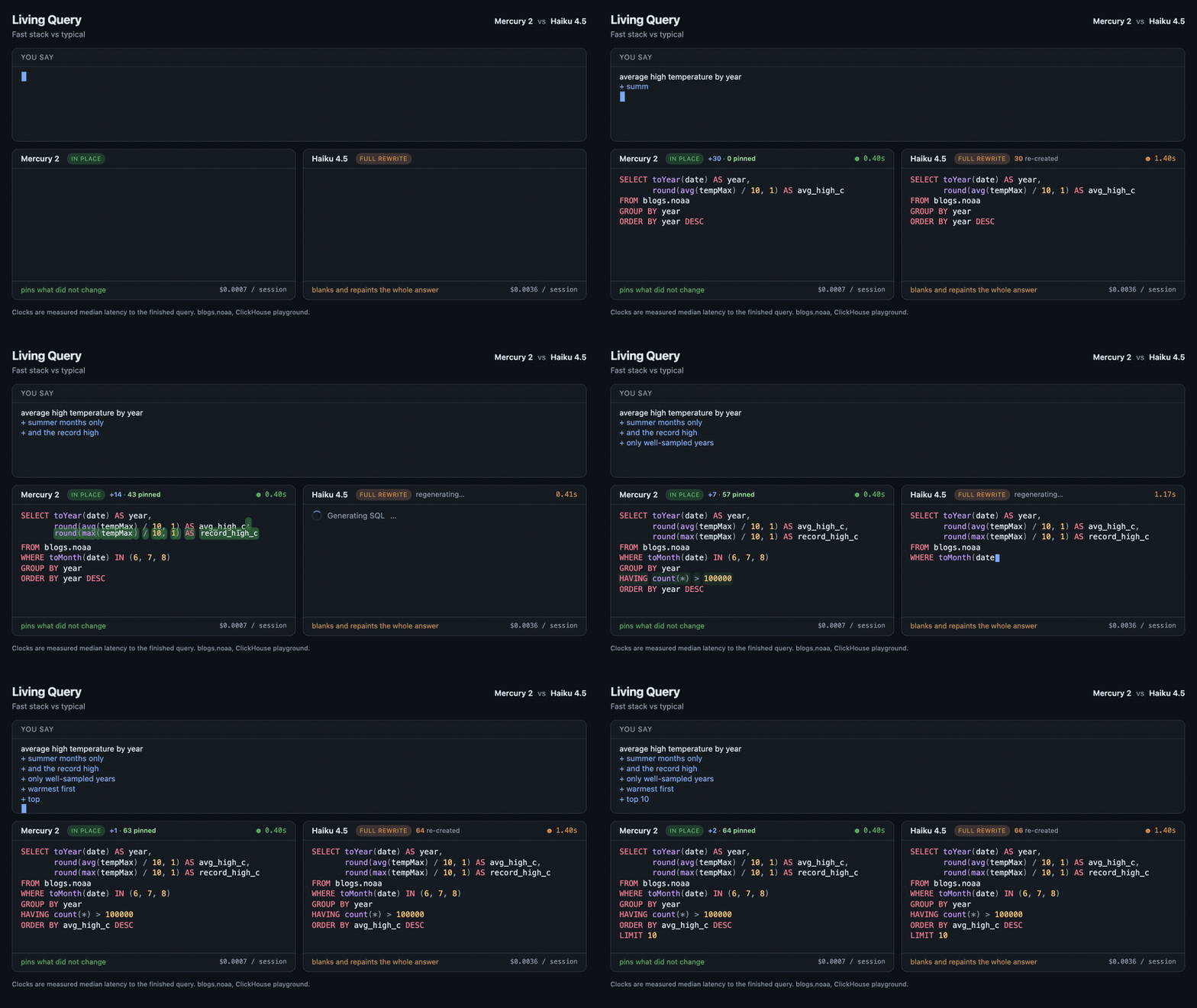
Same refinements, same data. On the left the SQL reforms in place. On the right it is rewritten from scratch each turn, the way every tool above does it.
Under the hood it’s just a client-side diff. Each time you refine, the model hands back a brand-new query. But instead of dumping that on the screen, Living Query lines it up against the query you were already reading, token-by-token, and only touches what actually changed. The unchanged tokens never flash, never reflow, never jump—they’re pinned. A new filter just appears where it should, like you’d reached in and typed it yourself.
Some Numbers (that don’t really matter)
As you can see from the GIF, it’s faster. And I wanted to know “how much faster”, so I measured perceived latency which I defined as the time from the moment you finish an edit to the moment the finished query is sitting on screen, ready to read. The clock starts the instant the request goes out to the model and stops the instant the model’s full answer is back. Same laptop, same wifi, each model called on its own native API, the same handful of prompts run about thirty times, and I took the median so one slow call couldn’t skew it. I clock the full answer and not the first flicker of text because the SQL can’t reform in place until the whole new query has arrived (the diff needs all of it) so that round trip is the number that actually matters. The browser’s own drawing time was tiny and the same across every run, so I left it out.
Here’s what came back:
| Model | Time to a finished query | Faster than Opus 4.8 |
|---|---|---|
| Mercury 2 (diffusion) | 0.40 s | 5.6x |
| Claude Haiku 4.5 | 1.40 s | 1.6x |
| Claude Opus 4.8 | 2.22 s | 1.0x |
Median of repeated runs per model (a dozen or more), same laptop and connection. Mercury is roughly 3.5x faster than a quick model like Haiku, and the gap only widens against a frontier model.
And yes, 5.6x is objectively faster. But as you can tell from the GIF, the qualitative experience of seeing only the relevant SQL render basically as fast as you can read it pushes this improvement beyond the threshold where a difference in degree becomes a difference in kind.
It’s not a faster UI. It’s a different way of working.
The Corvette of Models
“But Stevo,” you say. “Doing API calls every time you type anything in the prompt box will bankrupt you!”
Thank you, imaginary accountant. But it’s the same number of calls. A full-rewrite tool already hits the model on every refinement and regenerates the entire query. Living Query makes that exact same call and then does the diff in your browser, for free. In-place editing doesn’t add a cent. The only thing that moves the bill is which model you point it at—and Mercury, the one that makes this feel alive, is also the cheapest option. It’s not the Ferrari of models; it’s the Corvette (car nerds get me on that).
| Stack | Cost per editing session | Sessions per dollar |
|---|---|---|
| Living Query on Mercury 2 | $0.0007 | ~1,460 |
| Full rewrite on Haiku 4.5 | $0.0039 | ~255 |
| Full rewrite on Opus 4.8 | $0.0286 | ~35 |
A “session” is the six-edit example above. These are each model’s real token usage at its own price—Mercury runs ~1,500 in / 400 out, Opus ~2,500 / 650 because it writes longer SQL. Mercury $0.25/$0.75 per million tokens, Haiku $1/$5, Opus $5/$25.
So no, it won’t bankrupt you. Building an entire query costs about seven hundredths of a cent, and you could do it roughly fifteen hundred times for a dollar. The thing you were sure would empty your wallet is actually about 6x cheaper than running the same workflow on Haiku and about 42x cheaper than on Opus.
And the “every time you type anything” part? It doesn’t fire on every keystroke—it waits until you stop typing (technically, when a full 650ms passes with no new keystroke). The same client-side debounce trick that autosuggest uses.
Just as Trustworthy
To make sure I wasn’t trading speed for correctness, I ran all three models through Spider 1.0, the standard text-to-SQL benchmark: 1,034 questions across 20 databases, scored on execution accuracy. Same prompt for every model, sent as a one-shot.
| Model | Execution accuracy (Spider 1.0 dev) | Valid SQL | Time for all 1,034 |
|---|---|---|---|
| Mercury 2 | 73.2% | 99.1% | ~6 min |
| Claude Haiku 4.5 | 73.4% | 99.3% | ~17 min |
| Claude Opus 4.8 | 84.7% | 99.9% | ~35 min |
Mercury and Haiku are basically the same—two queries apart out of 1,034. So the fast, cheap, diffusion model is just as correct as a strong autoregressive model in its class. And now we know Mercury isn’t buying its speed by being wrong more often.
Also, this is one-shot and single-call. Production systems bolt on schema-linking and self-correction and push their accuracy into the mid-80s, so read 73% as a floor for a naive setup, not a ceiling. And Spider runs on SQLite, not ClickHouse, so it’s a proxy for the demo’s dialect, not the same thing.
Some Honest Caveats
Before you swap out all your client-side code, you gotta know it’s not all good news. I’ve made a toy to test a theory, not production code.
Diffusion isn’t doing the editing. The reform-in-place is a client-side diff. It works with any model. I ran the exact same trick on Haiku and Opus and it behaves identically. Mercury’s contribution is throughput, which is what makes regenerating on every pause feel live instead of laggy. This isn’t a “diffusion enables in-place editing” story. It’s a “a fast enough model makes continuous regeneration pleasant” story.
The diff-magic only works if the model holds its output steady. Pinning the unchanged tokens depends on the model handing back nearly identical text each turn. If it reshuffles clauses, renames an alias, or reformats its whitespace between refinements, the diff explodes and the whole effect falls apart. The demo behaves because the prompt begs for minimal edits and the model mostly listens. A flakier model would wreck it. (The principled fix is model-level infill—Inception literally ships this as Mercury Edit—but I didn’t use it for this toy test.)
My example only ever adds clauses. Every refinement in the demo stacks one more filter or column on, which is the easy case: small diffs, lots to pin. Ask for something that restructures the query—one table becoming a join, changing the grain of the aggregation, swapping the whole FROM—and you get a big diff on both sides. The in-place advantage shrinks right when the query gets gnarly.
On the same model, in-place isn’t actually faster. Haiku-in-place and Haiku-full-rewrite cross the finish line at the same time. The win there isn’t milliseconds, it’s that you never lose your place while you wait. The speed only shows up when you also switch to the faster model.
What you should take from this
Speed means more to user experience than just reducing the time they spend waiting around. Especially when doing data analysis. Database products like Clickhouse and DuckDB have query latencies that can drop below human reaction time (~200ms) and that has shifted our expectations of how quickly we should be interacting with data. LLMs with their seconds-long API calls now seem like a giant step backwards, even as we rely on them more for NL2SQL. But we shouldn’t get lulled into thinking “that’s just how things are” when latency has us screaming at the screen.
In the world of silicon, there’s always a “faster.”
Appendix: Run it yourself
Everything in this post is in one repo, MIT licensed: github.com/smledbetter/living-query. I shipped it as code so you don’t have to take my word for any of it.
Play with the UX. No key, no build step.
git clone https://github.com/smledbetter/living-query
cd living-query
npm start
Open http://localhost:3000 and hit Play. To feel it live with real model calls, grab a Mercury key, switch to the Live tab, and paste it in.
Recreate the GIFs. The three comparison clips are generated deterministically—each side animates at its real measured latency from a virtual clock, so nothing is hand-tuned. With the server running and ffmpeg on your path:
npm i playwright-core
node film/capture.mjs
The GIFs land in assets/.
Reproduce the numbers. Every claim—speed, cost, correctness—has a script in eval/ and a committed result file. Bring your own keys:
export INCEPTION_API_KEY=...   # or MERCURY_API_KEY
export ANTHROPIC_API_KEY=...   # for the Haiku and Opus baselines
cd eval
python3 latency.py             # time to a finished query, per model
python3 cost.py                # real token usage and dollars per session
For the Spider correctness run, the README walks through downloading the benchmark and scoring all three models. The gold-query sanity check has to hit 100% before any model spend, so you know the scorer itself works.
That’s the point of shipping it as code. If you think I got something wrong, go check.